


Acapella extractor
Quickly and easily extract acapella vocals from fully mixed songs for your practice sessions and beyond.

Acapella extraction explained
The term "a cappella" traditionally refers to a musical composition or performance that only uses vocal elements and does not have instrumental accompaniment. But in producer culture, an "acapella" is a vocal recording that is separated from its instrumental elements.
Producers sometimes use acapellas to place the vocals from one song into their own song, often as a sampling technique or as away to create a remix or mashup of the original work.
Of course, this should only be done when the producer has obtained legal permission from the appropriate rights holders.
Acapella extractor tools
So how do producers get acapellas for their music? One way is to get an official copy of the vocal recording from the rights holders, but this isn't always possible. Another way is to use an acapella extractor that can separate the vocal from the instrumental elements.
This is especially useful if the producer wants to experiment with acapellas for creative and learning purposes without obtaining the permission that is required for commercial use.
LANDR Stems, for example can separate any fully mixed song into four elements, "Vocals," "Drums," "Bass," and "Other. This is a fast and easy way to extract acapella vocals from any song.
.avif)
Mastering Demo
Making the most of your acapella extractor
Practice sessions
An inspiring way to use an acapella extractor is for practice sessons, whether you're a guitarist, a drummer, a keyboardist, or even a vocalist. Playing and harmonizing with an acapella from a song you love can be a great way to develop your skills, especially if you want to book gigs as a session musician. It can also lead to more powerful musical ideas, since a vocal track can easily inspire instrumental possibilities that are totally different from the original.
Remixes & mashups
One of the most popular ways to use an acapella extractor is for remixes and mashups. Producers can take the isolated vocal from one track and combine it with a different instrumental, creating something new while retaining the vocal’s original character. This approach can breathe new life into older songs or bring a unique twist to current hits. When it comes to good remixes and mashups, it's all about key matching, creative effects and playing with expectations.
Sampling
For even more creative possibilities, an acapella extractor can be a powerful tool for sampling vocals. Here the possibilities are endless, allowing you to chop, edit, and process a vocal to place it in an entirely new context. Some of the best tracks of all time have used sampled acapellas from other songs, so it's a pretty powerful technique. You can do this to develop your production skills or, if you have the legal rights, as part of a release.
Making an instrumental
Of course, when you use an acapella extractor on a track, you don't just get the vocal. You also get the instrumental, which has plenty of uses all on its own. This is pretty ideal for many kinds of practice sessions, especially if you're a vocalist. It can also help you get a better sense of the mixdown and the instrumentation if you're trying to learn from the producer's technique and gather inspiration.
Acapella extraction with LANDR Stems
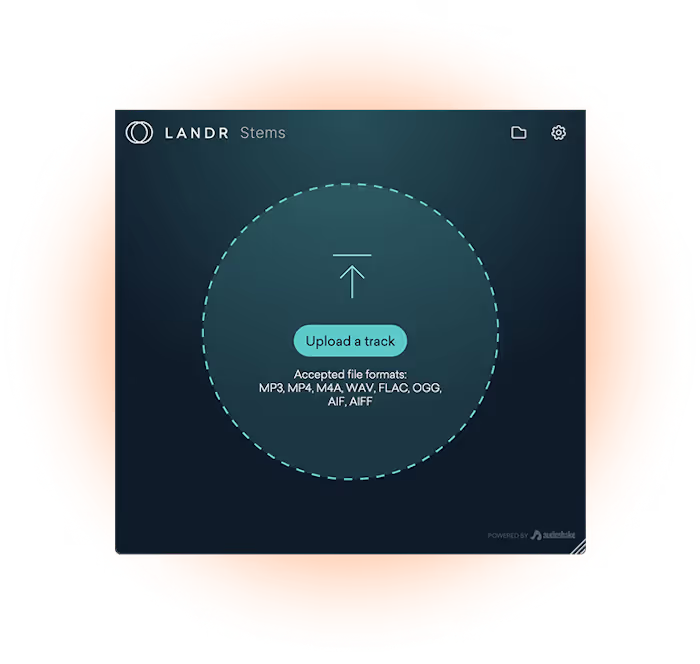
1. Import your mixed track
Open the LANDR Stems plugin in your DAW and load the mixed track you want to process. You can do this by dragging your audio file directly into the plugin window or by using your DAW’s file browser to select it.
For the cleanest separation, start with an uncompressed or high-quality file like WAV or AIFF. Once loaded, the plugin will be ready to extract your acapella.

2. Wait for processing
After you’ve imported your track, LANDR Stems will use its AI-powered separation engine to analyze the audio and split it into stems.
Processing time depends on the length and complexity of your track, but most songs only take a few seconds. You’ll see a progress indicator while the plugin works, so you know exactly when your acapella is ready.
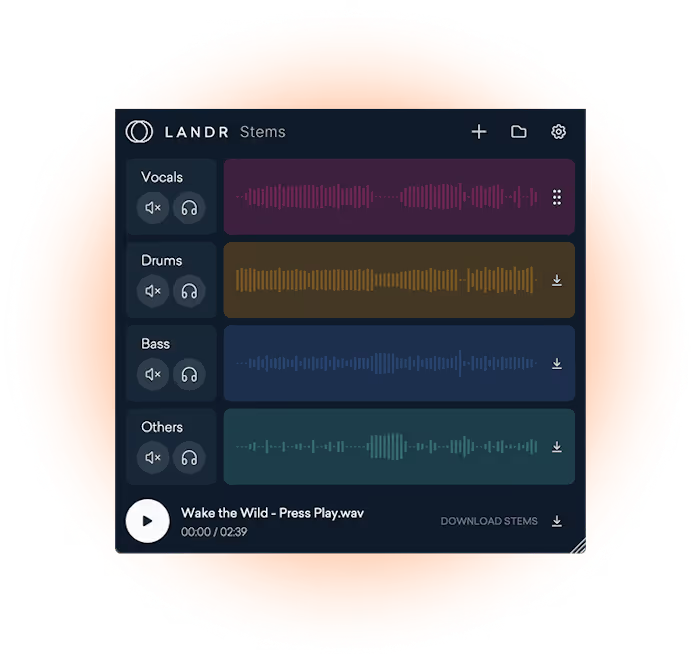
3. Drag and drop your acapella
When processing is complete, you'll find the Vocals stem at the top. You can audition it directly in the plugin to confirm it’s what you need, then drag and drop the acapella straight from the plugin into your DAW timeline or onto a track for editing.
From there, it's time to remix, add effects, or blend it into a mashup with other instrumentals.
FAQ: Acapella extractor
What is an acapella extractor?
Do acapella extractors affect audio quality?
Do acapella extractors affect audio quality?
Is it legal to use an acapella extractor on a copyrighted song?
Get LANDR Stems and much more


