What is EQ in music? The beginner’s guide
Improve the balance and quality of your music at every level.
.avif)
What is equalization?
Equalization (usually referred to as EQ) is the process of controlling the levels of specific frequencies in a sound or a full song. The tools that musicians and engineers use for this are called equalizers or EQs.
Both software and hardware EQs can be used at any level of the production process, from an individual instrument recording all the way to the final master.
Mastering Demo
How does EQ work?
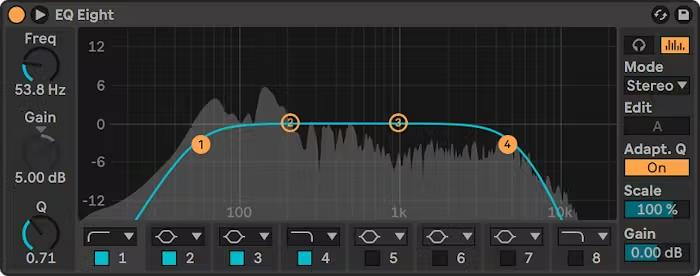
Equalizers use specialized filters controlled by various parameters. These filters are designed to boost or reduce frequency groups, which are often known as frequency bands.
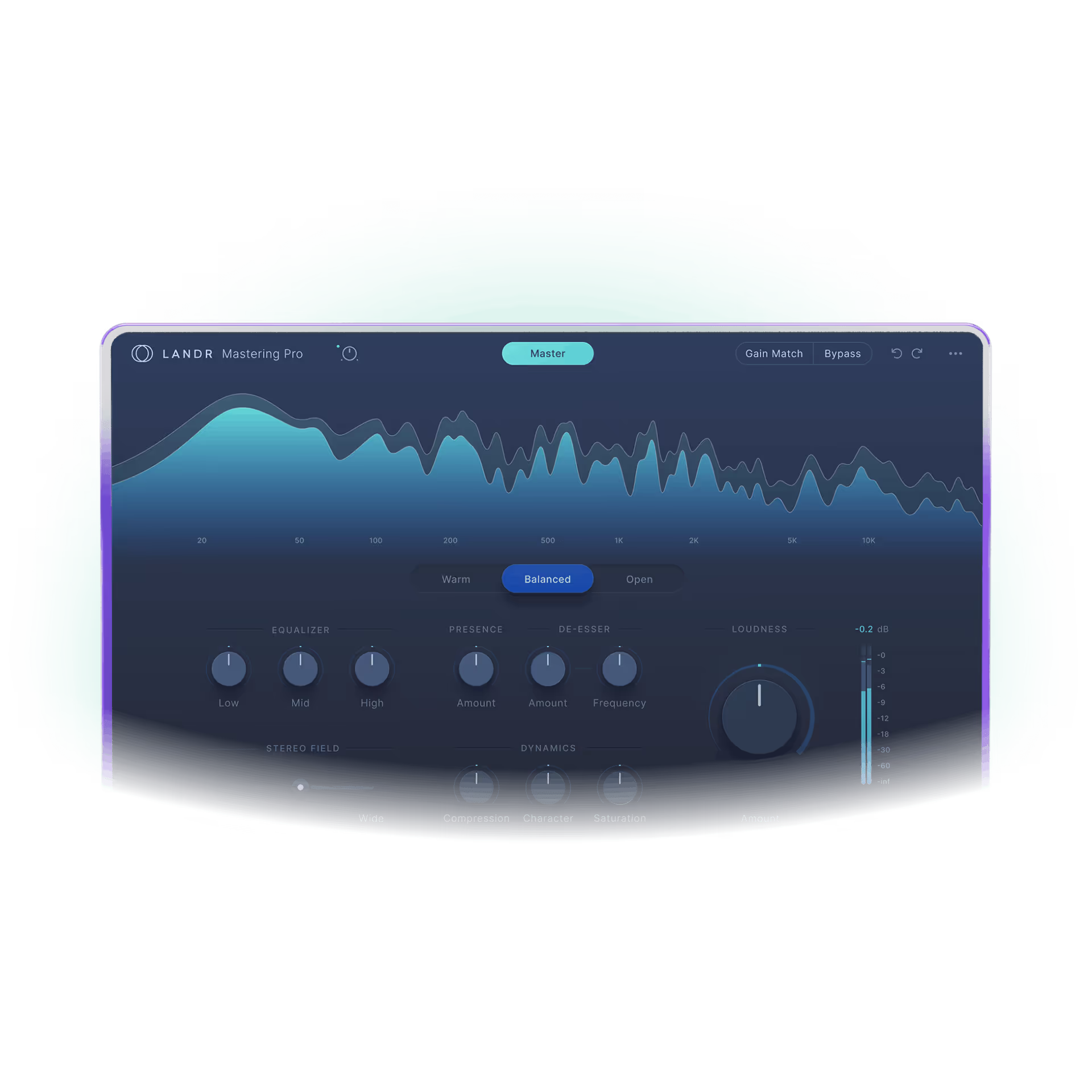
Some EQs also provide a visualizer that shows how the frequency spectrum of a sound is behaving in real time.
Here are some of the most important parameters you’ll find in an EQ:
Frequency (in Hz)
The main frequency you want to target
Q
The width or narrowness of the band around the main frequency
Gain (in dB)
The increase or decrease of the main frequency’s amplitude
EQ is one of the most important tools for finalizing a song. LANDR's intelligent mastering engine streamlines mastering EQ to get you the clarity and balance you need in minutes.
How to EQ your music
1. Use a visualizer
When learning how to EQ for the first time, it can be helpful to use an EQ plugin that offers a real-time visualization of the incoming sound. Use this to gain an understanding of the frequency spectrum by exploring different frequency ranges and what they sound like.
2. Use your ears
While visualizers are very handy, the most important skill you can develop as a music producer is your listening. Once you understand how the frequency spectrum works, place a parametric EQ without a visualizer on the track you want to equalize and listen carefully.
3. Find your frequency
While listening, identify tones that are either too strong or too weak. To find them with the EQ, create a frequency peak with a narrow Q, boost it enough that you can hear it, and sweep that peak across the spectrum until the tones you want to target become more audible.
4. Adjust the Q
Heading Text
Adjust the Q to better target the tones you want to address. If it’s too narrow, you may get unwanted artifacts in the sound. If it’s too wide, it can unnecessarily affect other frequencies. Set your Q no wider than is necessary for the main frequencies you need to adjust.
5. Adjust the gain
Now change the gain of your frequency band to adjust the strength of the tones you identified. It’s important to avoid making your boosts or reductions too drastic. Start with a 1–2dB adjustment and listen carefully to understand how the character of the sound changes.
6. Fine-tune and compare
EQ is a continuous process. You may need to fine-tune your parameters many times before improvements become apparent. It’s important to compare between when the EQ is active and when it’s bypassed, while also listening to the sound in context with the rest of your mix.
Audio Equalization (EQ): Terms you need to know
Frequency
Frequency band
Q
Gain
Parametric EQ
.avif)
Graphic EQ
.avif)
Bell curve
.avif)
Low cut/high cut
Low shelf/high shelf
.avif)
Linear phase EQ
EQ adjustments with very narrow Q factor or very steep slopes can introduce unwanted phasing artifacts that will affect clarity and quality. Linear phase EQ is sometimes used to avoid this.
Common EQ mistakes
Steep or narrow adjustments
Very narrow Q values or very steep cuts and shelves can introduce phasing artifacts into your sound, which can negatively impact the clarity of important tones and percussive sounds.
Drastic adjustments
It can be tempting to try and fully eliminate prominent frequencies or excessively boost ones you want more of, but a careful and precise approach will make for more balanced results.
Boosting instead of reducing
It’s generally a good idea to focus on the tones you want to reduce and then increase the overall gain of the sound, rather than use EQ simply to boost everything you want to boost.
Too much soloing
We hear sounds differently depending on the other sounds they’re mixed with. It’s important to fine-tune your EQ adjustments while paying attention to how they sound in the overall mix.
Letting frequencies build up
Bass sounds can contain unnecessary high-frequency tones, and vice versa for high-register sounds. Reduce these frequencies with cuts or shelves to avoid letting them build up in the mix.
Losing fundamental tones
Vocals, leads, and chords all have fundamental tones that are essential for the melodic and harmonic clarity of a song. Make sure that your EQing helps to support these tones.
A poorly-treated room
The acoustics of your space will affect how well you can identify and treat problems with EQ. Learn about common acoustic issues and know how to address them within your budget.
Over-emphasizing bass
Lower frequencies distort easily and can take up a lot of amplitude in a song, compromising the loudness and impact of your overall mix. Avoid boosting them too much, especially sub-bass.
Not knowing what you want
Using professionally-made songs as reference points can be very effective for training your ears and helping you understand how you want your music to sound. It will enable you to develop clearer goals and make more efficient EQ decisions.
Depending too much on EQ
Often the best EQ strategy is a preventative one. Learn proper recording technique and use high-quality source sounds in your music. These are essential skills that can help you avoid frustrating EQ problems later.
Use LANDR for fast, easy mastering EQ and so much more